





How Windows VPS RDS CAL Can Support Business Growth
Business growth often depends on having technology that can keep pace with changing workloads, expanding teams, and increasing customer demands. As organizations add employees, launch new services, and manage larger amounts of information, reliable remote access becomes increasingly important. A Windows VPS combined with the appropriate Remote Desktop Services Client Access Licenses can provide a flexible environment for businesses that need centralized access to applications, files, and computing resources. Understanding how Windows VPS RDS CAL solutions work can help organizations plan their technology infrastructure more effectively.
Understanding Windows VPS RDS CAL
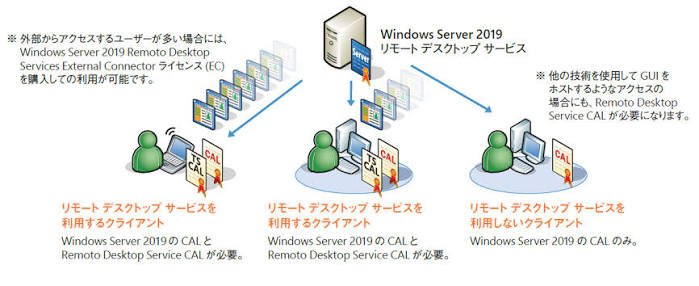
Windows VPS RDS CAL refers to the combination of a Windows Virtual Private Server and Remote Desktop Services Client Access Licenses. A Windows VPS provides a virtualized Windows server environment hosted on a physical server, while Remote Desktop Services allows authorized users to access Windows-based applications and desktops remotely.
An RDS CAL is a license that permits a user or device to access certain Remote Desktop Services functionality. Businesses should select licensing arrangements that match their usage and comply with Microsoft’s current licensing terms.
This combination can be useful for companies that require employees to work with centralized software and resources without depending entirely on individual physical computers.
Supporting Remote Work
Remote work has become an important part of modern business operations. Employees may need to access company applications while working from home, traveling, or operating from different offices.
A Windows VPS can provide a centralized environment that employees can connect to remotely. Instead of installing every application on every workstation, businesses can host compatible applications and resources within the server environment.
With properly licensed RDS access, authorized users can connect to their work environment from supported devices. This approach can help organizations create a consistent working experience across different locations.
Centralizing Business Applications
Growing businesses often use accounting software, customer management platforms, databases, productivity tools, and industry-specific applications. Maintaining these applications across numerous individual computers can create administrative challenges.
A centralized Windows VPS environment can simplify application management. Depending on the software requirements, applications can be installed and maintained within the server environment, allowing authorized employees to access them remotely.
Centralization can also make software updates easier to coordinate. Instead of updating applications separately on many computers, administrators may be able to manage compatible applications from a central environment.
Improving Scalability
Business requirements can change quickly. A company may start with a small team and eventually add employees, departments, locations, and applications. Infrastructure that cannot scale may become a barrier to expansion.
Windows VPS hosting can offer a scalable approach because resources can often be adjusted according to the hosting provider’s available configurations. Businesses can evaluate CPU, RAM, storage, and bandwidth requirements as their workloads develop.
When additional users require remote access, organizations can also review their RDS licensing requirements and ensure that the appropriate number and type of CALs are available.
Supporting Distributed Teams
Companies with multiple offices may need employees in different locations to access the same business resources. A centralized server environment can reduce the need to maintain separate infrastructure at every location.
For example, a company with offices in several cities could host compatible business applications on a Windows VPS. Employees in each office could connect to the centralized environment through an appropriate remote access setup.
This can create a more unified technology environment while giving administrators a central point for managing applications and resources.
Enhancing IT Administration
Managing many individual workstations can require considerable time from IT staff. Each computer may have different configurations, software versions, updates, and troubleshooting requirements.
A centralized Windows environment can simplify certain administrative tasks. System administrators can manage server-side applications, user permissions, security settings, and other resources from a central location.
However, centralized infrastructure also requires proper administration. Businesses should establish strong passwords, appropriate access controls, regular updates, backup procedures, and monitoring practices.
Managing Costs More Efficiently
Technology costs can increase as a business grows. Purchasing and maintaining physical servers, upgrading office hardware, and deploying applications across numerous workstations can require significant investment.
A Windows VPS may provide an alternative to purchasing and maintaining dedicated physical infrastructure for certain workloads. Businesses pay for the resources and services included in their hosting plan, while the hosting provider typically manages the underlying physical infrastructure.
The financial benefits depend on workload requirements, user numbers, licensing costs, support requirements, and the provider’s pricing structure. Organizations should calculate their total cost of ownership before selecting an infrastructure model.
Supporting Business Continuity
Business interruptions can affect productivity, customer service, and revenue. A properly managed VPS environment can contribute to continuity planning when combined with appropriate backups and disaster recovery procedures.
Businesses should determine how important applications and data will be protected if the server experiences a failure. Regular backups, recovery testing, redundancy, and documented procedures can help organizations prepare for unexpected incidents.
A Windows VPS should therefore be considered as one component of a broader business continuity strategy rather than a complete disaster recovery solution by itself.
Providing Flexible Access to Resources
Modern employees may use desktops, laptops, tablets, and other supported devices to perform their work. Remote desktop technologies can provide a way to access a centralized Windows environment from compatible endpoints.
This can be particularly useful for businesses with employees who move between locations. Rather than carrying a specific office computer everywhere, an authorized employee may be able to access the required working environment remotely.
Organizations should still evaluate endpoint security, network quality, authentication, and application compatibility before deploying remote access widely.
Strengthening Security Management
Centralization can also support more consistent security administration. Instead of managing application access independently across many computers, administrators can establish centralized user permissions and security policies where appropriate.
Businesses should use strong authentication practices, limit administrative privileges, keep operating systems and applications updated, and monitor unusual access activity.
RDS environments should also be configured carefully. Exposing remote desktop services directly to the public internet without appropriate security controls can create unnecessary risks. Organizations should follow current Microsoft security and deployment guidance and use suitable network protections.
Preparing for Future Expansion
Technology decisions made today can influence how easily a business expands tomorrow. A flexible server environment can provide a foundation for adding users and applications as business requirements change.
Before implementing Windows VPS RDS CAL infrastructure, companies should assess expected user numbers, application requirements, storage needs, performance expectations, compliance obligations, and licensing requirements.
A well-planned environment can help businesses avoid unnecessary infrastructure changes as they grow. It can also provide administrators with greater visibility into centralized resources and user access.
Conclusion
Windows VPS RDS CAL solutions can support business growth by providing centralized computing resources, remote access, flexible infrastructure, and simplified administration. They can be particularly useful for organizations with distributed employees, centralized applications, or changing technology requirements.
However, successful implementation requires more than simply purchasing a server and licenses. Businesses should carefully evaluate their workloads, select appropriate resources, follow Microsoft’s licensing requirements, implement strong security controls, and maintain reliable backup and recovery procedures.
When properly planned and managed, a Windows VPS with suitable RDS licensing can become a practical component of a scalable IT infrastructure. It gives growing organizations a centralized environment that can adapt to changing workforce requirements while helping them manage applications and computing resources more efficiently.