Understanding Windows VPS RDS CAL Licensing
Running Windows applications through a virtual private server can provide flexibility, centralized management, and remote access for businesses of many sizes. However, organizations need to understand the licensing requirements before deploying remote desktop services. The term Windows VPS RDS CAL refers to the licensing relationship between a Windows VPS environment, Remote Desktop Services, and the Client Access Licenses required for users or devices accessing those services.
A Windows VPS can host applications, desktops, databases, and business tools in a remotely accessible environment. When Remote Desktop Services is used to provide access to Windows-based workloads, appropriate licensing becomes an important part of deployment planning. Rather than treating licensing as an afterthought, organizations should consider it alongside server capacity, user requirements, security, and operational costs.
Why RDS CALs Matter
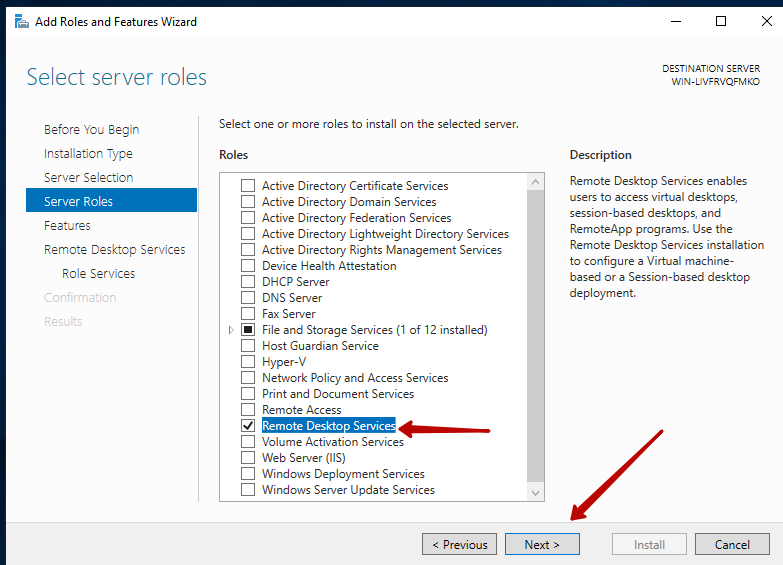
Remote Desktop Services, commonly known as RDS, enables users to connect remotely to Windows Server resources. While Windows Server licensing covers the server operating system itself, RDS functionality generally involves additional access licensing.
An RDS CAL is typically associated with a user or device that accesses Remote Desktop Services. The appropriate licensing model depends on how an organization operates its remote environment. Understanding this distinction can help prevent situations where a company purchases server resources without adequately planning for user access rights.
For businesses evaluating a windows vps rds cal solution, the first step should be identifying who will connect to the server and how frequently they will use the remote environment.
User CAL and Device CAL Strategies
One of the most important licensing decisions involves choosing between user-based and device-based access models. A User CAL generally focuses on an individual user who may access the remote environment from multiple devices. This can be useful when employees work from office computers, laptops, tablets, or other supported devices.
A Device CAL instead focuses on a particular device accessing the service. This can make sense in environments where several employees share the same workstation, such as reception areas, laboratories, classrooms, or shift-based operations.
The right strategy depends on the organization’s working pattern rather than simply choosing whichever option appears cheaper. Businesses should evaluate the number of employees, devices, shifts, remote workers, and shared workstations before making a decision.
Matching Licensing to Business Size
Small businesses often have relatively simple remote-access requirements. A limited number of employees may need access to a Windows VPS for accounting applications, management software, file systems, or specialized programs. In these cases, carefully matching licenses to actual users can help maintain predictable costs.
Medium-sized organizations may require more detailed planning. They could have departments with different access requirements, employees using multiple devices, and a mixture of office-based and remote workers. Documenting access patterns before selecting a licensing model can make administration easier.
Larger businesses may need a structured licensing strategy that considers multiple servers, locations, departments, and changing employee numbers. Licensing should be reviewed whenever the infrastructure expands because adding users or devices can affect overall requirements.
Evaluating VPS Providers
Choosing a Windows VPS provider is another important part of the process. Providers can offer different server configurations, management options, and licensing arrangements. Organizations should carefully determine which licenses are included in a VPS package and which must be obtained separately.
A provider’s advertised Windows VPS price should not automatically be interpreted as the complete cost of running an RDS environment. Businesses should ask whether Windows Server licensing, RDS licensing, administrative services, backups, and other components are included or separately charged.
When evaluating a windows vps rds cal setup, transparency is particularly important. Written licensing information can help organizations understand what they are paying for and reduce confusion during deployment.
Planning for Growth
Licensing strategies should not only address current requirements. Businesses often add employees, contractors, locations, and devices over time. A licensing approach that works for ten users may need to be reconsidered when an organization grows to fifty or one hundred users.
Creating a simple growth forecast can make future planning easier. Organizations can estimate expected user numbers, device counts, application requirements, and remote-access patterns for the next twelve to twenty-four months.
This approach helps businesses avoid making decisions based solely on today’s infrastructure. It also encourages regular licensing reviews whenever significant operational changes occur.
Keeping Licensing and Security Separate
Licensing compliance and cybersecurity are different responsibilities, but both should be considered during Windows VPS planning. Having the correct RDS CALs does not automatically make a remote desktop environment secure.
Organizations should also use strong authentication, appropriate firewall rules, regular security updates, restricted administrative privileges, monitoring, and reliable backup procedures. Remote desktop access should be limited to authorized users and configured according to the organization’s security requirements.
A properly licensed server can still become a security risk if remote access is poorly configured. Therefore, licensing should be treated as one component of a broader infrastructure strategy.
Avoiding Common Licensing Mistakes
One common mistake is assuming that a Windows VPS subscription automatically includes every license required for remote access. Another is selecting User CALs or Device CALs without first understanding how employees actually connect.
Organizations may also overlook temporary workers, contractors, shared computers, or secondary devices when estimating licensing requirements. Keeping an accurate record of authorized users and devices can make ongoing administration much easier.
Another mistake is purchasing licenses from sources that cannot clearly demonstrate authorization. Businesses should work with reputable providers and verify licensing terms through official Microsoft documentation or qualified licensing professionals when necessary.
Creating a Practical Licensing Strategy
A practical strategy begins with an inventory. List the Windows VPS servers, applications, expected users, devices, and connection methods. Next, determine whether users or devices are the more appropriate licensing basis.
The organization should then review provider terms, calculate the total expected cost, and establish a process for adding or removing licenses as the environment changes. Maintaining licensing records is especially useful for businesses with multiple administrators or rapidly changing teams.
It can also be helpful to schedule periodic reviews. During each review, compare actual usage with the current licensing arrangement and identify upcoming changes that could affect requirements.
Cost Considerations
Cost should be evaluated across the entire environment rather than focusing only on the VPS subscription. A complete budget may include server resources, Windows licensing, RDS CALs, storage, backups, security tools, administration, monitoring, and technical support.
The cheapest initial option is not always the most economical long-term solution. For example, choosing a licensing model that does not align with the organization’s workforce could create unnecessary expenses as the company grows.
A detailed total-cost analysis allows decision-makers to compare different deployment approaches more realistically.
Staying Compliant Over Time
Licensing is not a one-time decision. Businesses should maintain records of purchases, assignments, users, devices, and infrastructure changes. When employees leave, departments change, or servers are replaced, the organization should review whether its licensing records remain accurate.
Microsoft licensing rules can also change, so organizations should verify current terms before making significant purchasing or architectural decisions. For complex deployments, professional licensing advice can provide additional assurance.
Conclusion
Developing an effective windows vps rds cal strategy requires more than selecting a VPS package. Organizations need to understand their remote-access requirements, determine whether user or device licensing is appropriate, evaluate provider terms, plan for growth, and maintain accurate licensing records.
The strongest approach combines licensing compliance with infrastructure planning and security. By evaluating users, devices, costs, and future expansion before deployment, businesses can create a Windows VPS environment that is easier to manage and better aligned with their operational needs. Always verify current Microsoft licensing requirements and provider terms before purchasing or deploying RDS services.